Your phone can do more.
Automatically.
Visual workflow builder on your smartphone. Connect triggers and actions. No sign-up needed to try it out. AI assistant and cloud sync available with a subscription.
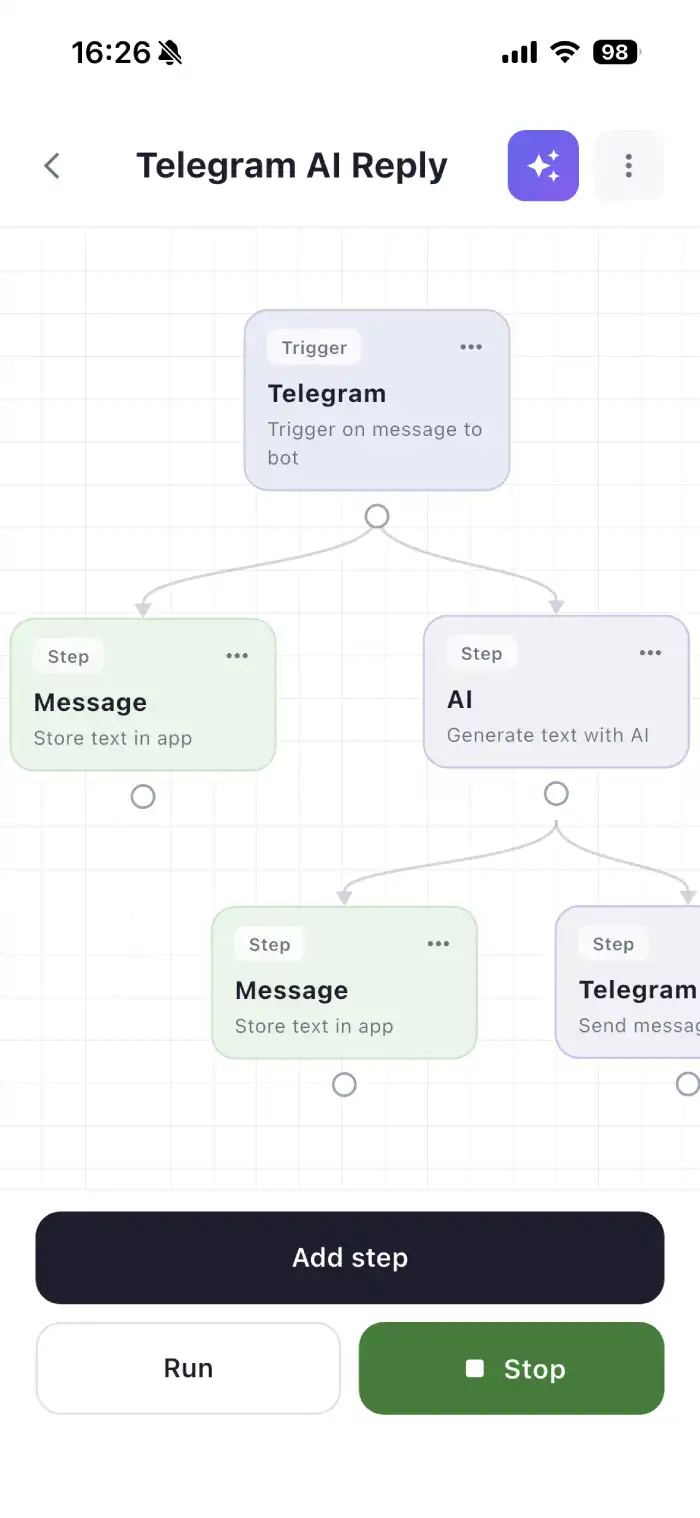
n8n for smartphone? Zapier alternative on the go?
8gent is the mobile automation app for anyone who wants to build workflows like with n8n or Zapier right on their phone. No desktop needed, no IT skills. Connect triggers and actions, use calendar, email, Telegram, location, and AI. If This Then That for iPhone and Android. Made in Germany, data in Frankfurt.
Looking for no-code automation on the go? 8gent connects time, location, webhook, form, and more with push, HTTP, Slack, AI text, and wait. Simple like IFTTT, powerful like n8n. Start free, go Pro for AI and cloud sync.
Examples
How others use 8gent in everyday life.
Record audio & share
Record voice notes directly in the app. Have them transcribed or summarized and sent by email automatically.
Turn down heating when you leave
Leave home and your heating automatically turns down. No more manual switching.
Process emails automatically
Have new emails read, summarized, or pre-drafted with AI. Stay informed without inbox chaos.
Photograph documents & save as text
Take a photo of a document with your iPhone. Save it as searchable text directly to your database or notes app.
The possibilities are endless.
Same routine, every day?
Setting reminders, forwarding messages, updating calendars, sorting emails. Your phone can handle all of this on its own. 8gent connects triggers and actions in one clear flow.
No code. No desktop. Just your phone and your rules.
Like n8n or Zapier, but on the go. You stay in control.
How it works
Four steps to your first workflow.
Choose a trigger
Pick what starts your workflow: time, calendar event, location, webhook, form, email, Telegram, and more.
Add actions
Build your flow: push notification, email, Slack, Telegram, HTTP request, AI text, wait, branches.
Set up connections
Optional: Add credentials for email, calendar, Slack, or Telegram. Securely encrypted in the app.
Launch & monitor
Start manually or automatically. View executions and logs in real time.
Everything you need
Trigger. Action. Done.
Triggers
Start workflows automatically.
Time · Calendar · Location · Webhook · Form · Email · Telegram · Audio · Wi-Fi/Bluetooth · File/Image (AI)
Actions
Let your phone take action.
Push · HTTP · Email · Slack · Telegram · Calendar · AI (Text & Audio) · Wait · Conditions
AI Assistant
Tell it what your workflow should do. The assistant suggests the flow. No builder knowledge needed.
Discover
Browse pre-built workflows from the marketplace. One tap, and it runs.
Private & secure
Data on German servers (Frankfurt), encrypted, no sharing with third parties. Auto-deletion after 10 days of inactivity.
Start for free
Unlock advanced features with a subscription.
Pro
AI nodes, audio transcription, server execution, cloud sync.
Download on the App StorePro from €9.99/month. Three tiers, monthly AI budget included.
See details in the app.
The person behind it

Florian Buchmann
Software developer from Germany
Your data on servers in Germany. No selling, no ad tracking.